10+ forecast sources
Apple Weather, Google Weather, OpenWeather, Open-Meteo, NWS, and more — switch sources to stay future-proof.
Weather watch face for Wear OS 5, 6 & Pixel Watch
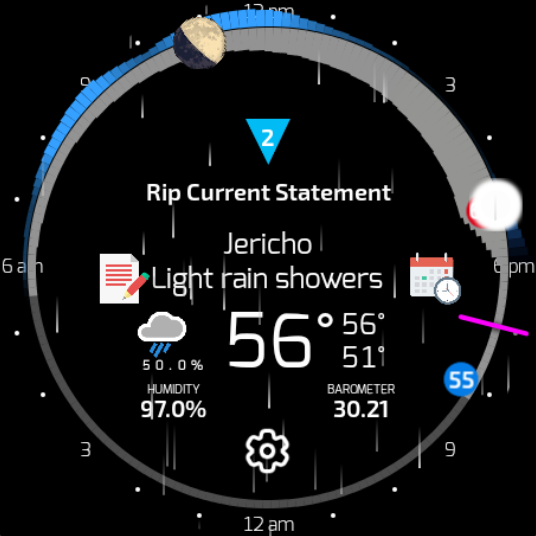
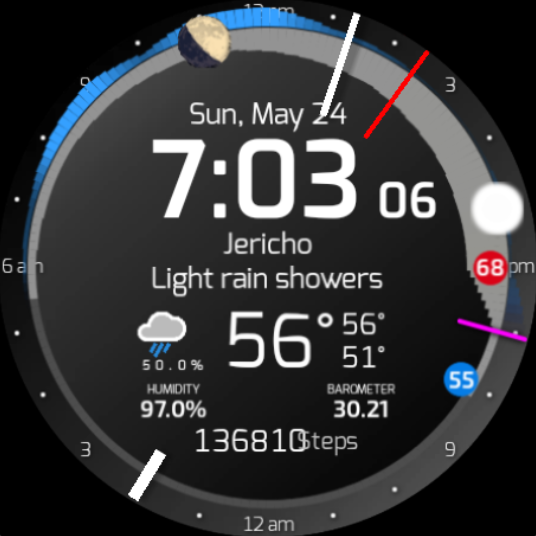
SkyHalo™ 2 turns your watch into a living forecast: temperature, clouds, rain, snow, wind, moon phase, and global weather alerts — in one intuitive halo ring.
Two-part install for Wear OS 5+: app/complication first, then the free WFF watch face.
The most weather information available in any Wear OS watch face — tested on Wear OS 4.x, 5.x, and 6.x.
Apple Weather, Google Weather, OpenWeather, Open-Meteo, NWS, and more — switch sources to stay future-proof.
Read clockwise from the hour hand: ring width = temperature, color = cloud cover, outer halo = rain or snow.
Up to 10 days daily and 72 hours hourly. Extended tables and AI descriptive text forecasts.
Color-coded alert triangles with severity, timing, and full detail — tap to open advisories.
Live moon phase and position, sunrise/sunset on the ring, rise/set times on tap.
Use SkyHalo as a full watch face or add the tile, carousel widget, and complications to any face.
Cycle center display: temperature, wind speed/direction/gusts, or precipitation intensity.
Configure sources, units, colors, standby screen, backup/restore, and install to your watch from your phone.
Glance at the ring and know: cool and raining now, clearing around 2 pm, warmest about 4:30 pm, sunset near 6:15 pm.
Tap the right edge to jump +12 / +24 / +36 hours. Tap icons for daily/hourly tables and text forecasts.
SkyHalo 2 is split into two Play Store apps — required by Wear OS Watch Face Format (WFF).
Open on your watch, grant location permission (outdoors works best), or set location manually in the phone app.
Provides time, date, hands, fonts, colors, and three complication slots — with SkyHalo full-screen.
Long-press the watch face → edit → top complication slot → choose SkyHalo™ 2.
Tap the upper area to open the full SkyHalo app; use gear, forecast, and alert hotspots on the face.
Main app, complication data source, tile & widget. Wear OS 5+.
Google Play — AppFree WFF watch face container. Install after the main app.
Google Play — Watch FaceSkyHalo 2 targets Wear OS 5+ (Pixel Watch, Galaxy Watch 4+, OnePlus Watch, and similar). Tested on Wear OS 4.x through 6.x.
Starting with Wear OS 5, watch faces must use Watch Face Format without executable code. SkyHalo’s weather engine runs in the complication app; the free front end displays it as a full watch face.
Forecasts refresh about every six hours; current conditions interpolate every five minutes. Weather alerts update as new advisories arrive.
Most settings work on-watch. The Android phone companion app makes backup, restore, manual location, and remote install easier.
Email skyhalo2@videotropic.com.